
Appraising the Direct Impacts of Aerosol on Climate
ADIENT Data Collocator
Introduction
The purpose of the ADIENT Data Collocator is to extra satellite data
along the flight track of the FAAM aircraft for a specific
mission. The code uses the location and time information from FAAM
core data files to define a series of points around which data is
extracted from the satellite data files. At present the code is only
able to read MODIS L2 files, but it will eventually be able to
handle:
- MODIS L2
- GlobAEROSOL daily aerosol product files (ATSR-2, AATSR, MERIS, SEVIRI)
- MISR
The code is available as both an IDL procedure, which can be
incorporated into larger IDL programmes, and a stand-alone
precompiled IDL run-time (RT) application with a graphical user
interface. The RT version of the tool is suitable for use with the
(free to download) IDL Virtual Machine, for those without access
to a licensed version of IDL.
Download
Use the following links to download the code:
Using the IDL procedure
The command line call to run the IDL procedure form of the
collocator has the form:
IDL> adient_data_collocator, faam_core, modisl2=modisl2,
maxdist=maxdist, maxtime=maxtime, ftime=ftime, track=track,
save=save, llimit=llimit, tlimit=tlimit, modisdir=modisdir
Each of the arguments is defined as follows:
- faam_core: The location of the FAAM Core Data file
corresponding to the flight of interest.
- modisl2=modisl2: A named variable into which the processed
MODIS L2 data will placed. This keyword is the main return variable
of the procedure.
- maxdist=maxdist: Sets the maximum spatial separation
between a point along the aircraft track and a satellite pixel for
the two measurements to be considered collocated. Defaults to 10 km.
- maxtime=maxtime: Sets the maximum temporal separation
between a point along the aircraft track and a satellite pixel for
the two measurements to be considered collocated. Defaults to 60
mins.
- ftime=ftime: Sets the temporal spacing of samples along
the flight path in minutes. Defaults to 30 mins.
- track=track: On return will contain the actual points
sampled from the flight path (latitude, longitude, Julian day).
- save=save: If specified, the extracted data will saved in
a NetCDF file. If save is set to 1 the file will
have the name "FAAM_satellite_collocated_data_nnn.nc", where nnn is
the flight number of the FAAM sortie in question, otherwise the
value of save will be used as a file name.
- llimit=llimit: Limits the analysis to a specified
latitude-longitude box. Should be an array of this format: [min_lat,
min_lon, max_lat, max_lon].
- tlimit=tlimit: Limits the analysis to a specified time
period. Should be a two element array: [min_sec, max_sec] in units
of seconds since the start of the day (UT).
- modisdir=modisdir: Sets the directory in which to search
for MODIS L2 data. If this keyword isn't set, the code looks for the
environment variable "MODIS_DIR" and if this doesn't exist, the
current working directory is used.
The modis_l2 variable returned by the procedure will be a
structure which will contain a substructure for each match between the
satellite and FAAM data. In turn, each one of these substructures
contains all of the MODIS L2 variables which met the selection
criteria for the given point along the flight path. If requested, the
output NetCDF file will mirror the structure of the modis_l2
variable.
Using the IDL procedure
The run-time version of the code simply provides a standalone wrapper
for the procedure described above. To run the programme you will
need to have either a full version of IDL, or the IDL Virtual
Machine installed. To then run the code, you can either run the IDL
Virtual Machine (under Linux the command is: idl
-vm=adient_data_collocator_rt.sav) or, under Windows/Mac, double
click the "adient_data_collocator_rt.sav" file. On running the
application you should be presented with a window that resembles
this:
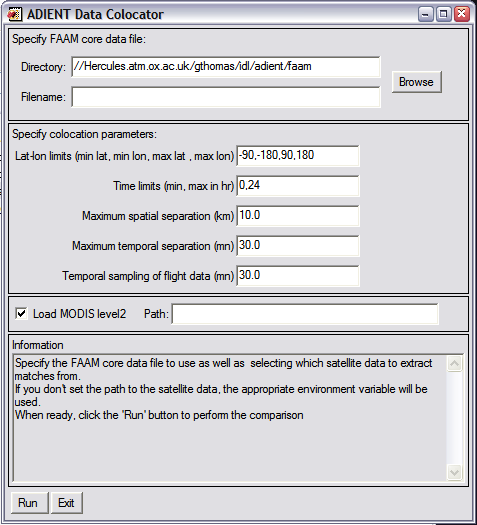 All of the variables which can be specified with
the IDL procedure version of the code are
available via the various boxes in the GUI. Once things are setup the
way you want them, simply click the "Run" button.
All of the variables which can be specified with
the IDL procedure version of the code are
available via the various boxes in the GUI. Once things are setup the
way you want them, simply click the "Run" button.
Of course, since this is a standalone tool, the only way to output
the data is via the NetCDF output file (equivalent to setting
the save keyword in the procedure version.
|


