

Aerosol Refractive Index Archive - Documentation
File Naming Convention
Files in this database have the following general convention:
composition[_descriptor1][_descriptor2]...[_axis]_Author_year.ri
-
compositionis a concise description of the composition or material of the measured sample. Ordinary material names are written in lower case. Chemical formulae retain their conventional capitalisation, for exampleHNO3andH2O. -
descriptoris an optional field used when additional information is required to identify or distinguish the dataset. There may be more than one descriptor. Examples include concentration, temperature, relative humidity, sample number, altitude, composition variant, or another experimentally meaningful distinction. Each logically separate descriptor is separated by an underscore. -
Numerical descriptors include their units where applicable so that their meaning is unambiguous. For example,
30%,223K, and12km. Thus nitric acid at 30% concentration and 223 K is writtenHNO3_30%_223K_, notHNO330_223_. -
Sample identifiers are retained whenever they distinguish different refractive-index datasets. They are written as separate descriptors, for example
sample_1andsample_2. Dataset-discriminating information must not be removed merely to shorten or standardise a filename. -
If the material is birefringent then the ordinary and extraordinary rays are separated as follows:
composition_O_Author_year.ricomposition_E_Author_year.ri
composition_X_Author_year.ricomposition_Y_Author_year.ricomposition_Z_Author_year.ri
calcite_100K_E_Posch_2007.ri. -
Authoris the surname of the first author of the published paper from which the data is taken, or the name of the scientist or laboratory that provided the data. The name uses its normal capitalisation, for exampleBiermann,Peterson, orPeters. Compound surnames are retained in full. Spaces within a surname are represented by underscores, while hyphens are retained only where they are part of the author's actual surname. For example,Lund Myhreis represented asLund_Myhre. -
yearis the year of publication or data release. For a published work this is the bibliographic publication year used in the formal citation; it need not be the same as a year appearing within the DOI.
Only descriptors required to identify or distinguish the dataset are included. Fields which are not relevant are omitted. Examples include:
HNO3_30%_223K_Biermann_2000.ricalcite_100K_E_Posch_2007.riquartz_E_Peterson_1969.riobsidian_sample_1_Pollack_1973.riobsidian_sample_2_Pollack_1973.riice_166K_Curtis_2005.risand_50%RH_Peters_2009.ri
The order of filename components is, where applicable, composition_concentration_temperature_other-descriptor_axis_Author_year.ri.
The overriding principle is that the filename must contain sufficient information to distinguish the refractive-index dataset from other ARIA datasets from the same material and source. Meaningful distinctions such as sample number, concentration, temperature, optical axis, humidity, altitude, or other sample properties must therefore be preserved where required.
Some datasets are supplied in both an interpolated form and an original form. The interpolated file uses the standard filename above. The corresponding original, non-interpolated file is distinguished by adding _R immediately before the author component. For example:
HNO3_30%_223K_Biermann_2000.ri— interpolated datasetHNO3_30%_223K_R_Biermann_2000.ri— original dataset
The _R marker is a dataset descriptor indicating the original measurements and must be retained when it distinguishes the original data from the corresponding interpolated file.
Data Format
Refractive index data is formatted in ASCII and comprises two components:
- A header describing the file. Header lines start with the
#character and defined Keywords, i.e.#Keyword = some text - The data which is formatted into columns which are separated by white space (tabs or spaces)
Notes
Legitimate Keywords are:
FORMATDESCRIPTIONDISTRIBUTEDBYSUBSTANCESAMPLEFORMTEMPERATURECONCENTRATIONREFERENCEDOISOURCECONTACTCOMMENT
The only compulsory Keyword is FORMAT which defines the columns of data. Valid FORMAT components are:
-
WAVLwhich indicates the column contains the spectral location in wavelength (μm) -
WAVNwhich indicates the column contains the spectral location in wavenumbers (cm-1) -
Nwhich indicates the column contains the real part of the refractive index -
DNwhich indicates the column contains the uncertainty in the real part of the refractive index -
Kwhich indicates the column contains the imaginary part of the refractive index (always positive) -
DKwhich indicates the column contains the uncertainty in the real imaginary part of the refractive index
Examples:
#FORMAT = WAVL N DN K DKimplies there are five columns: wavelength, real part, real error, imaginary part, imaginary error#FORMAT = WAVN K DKimplies there are three columns: wavenumber, imaginary part, imaginary error
Each row must contain data for all included columns.
For example, if FORMAT = WAVL N K and K (the imaginary part) goes to zero at some wavelength you cannot stop giving a value for K.
In this case, you would just repeat zeros.
K is generally positive.
There are some cases where K is slightly negative due to measurement noise.
In this cases read_ri forces the value to zero.
As the number of Keyword definitions can vary the length of the number of header lines can vary but must be at least one (to define FORMAT).
To avoid very long lines Keyword definitions can extend over more than one line by using ## as the continuation code. For example:
#COMMENT = This is a very long comment split
## over more than one line
ARIA will compile and read_ri.pro will work if only the FORMAT Keyword is present however you are strongly encouraged to define the DESCRIPTION and REFERENCE Keywords.
Additional keywords can be included but will be ignored in forming ARIA and by read_ri.pro.
In compiling ARIA the fields are passed as HTML so use HTML format commands if you want to include subscripts, Greek characters etc.
The DOI keyword will be used to generate a hyperlink on ARIA/data, so the tag should just consist of the DOI and nothing else (so that the hyperlink works) e.g. #DOI=10.1021/jp992349i.
Directory structure
The ARIA datasets are all organised by category then substance. The substance directories are then organised by sample or property, depending on what is relevant for the data. For example, volcanic ash is organised by volcanic eruption (sample) whereas ice is organised by temperature (property). The data is then finally organised by interpolation if there are interpolated and original data files available.
For example, a typical nitric acid directory path is:
Acids/Nitric/0%_to_19%/Nitric_acid_0%_263K_(Biermann_et_al_2000)/interpolated/HNO3_0%_263K_Biermann_2000.ri
Interpolation
Some of the refractive index data has small gaps which limits their usefulness. In these cases, we have interpolated the measurements to provided synthetic data. We have used the Piecewise Cubic Hermite Interpolating Polynomial (PCHIP), which is a shape-preserving piecewise cubic interpolation. The two figures below show the performance of the PCHIP method compared to a more traditional spline approach.
| PCHIP | Spline |
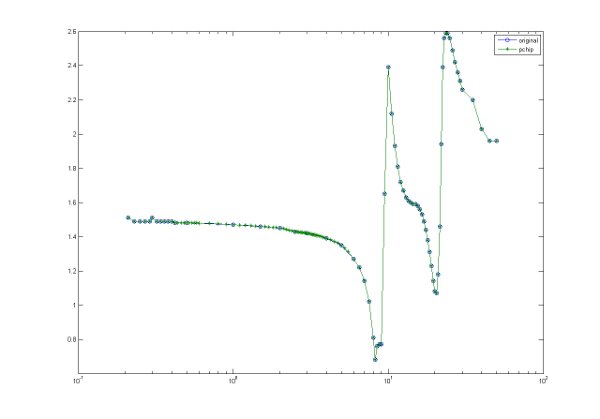
|
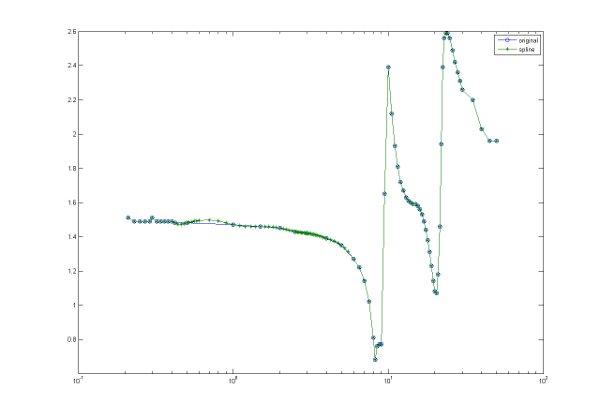
|
| Click on the images for larger versions | |
Files which include synthetic data include a comment to that effect in the file header.
The original files which do not contain any synthetic data have a filename which differs from the standard ARIA filename by the addition of _R immediately before the author component.
Read Routines
Routines to read refractive index files:Note that collections of files must be unpacked before they can be read.